Type as much as you want.
Not as much as you can.
Runs on your computer, learning the way you write.
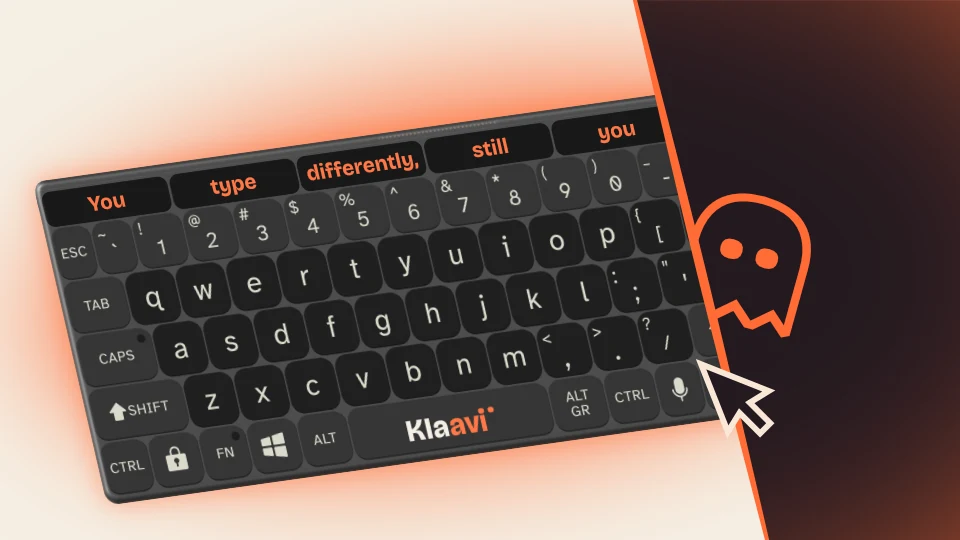
Works with every Windows application
Every feature
saves you clicks.
Every one of them has one job: to make writing easier. On your own terms.
Ghost Mode makes the keyboard disappear
Klaavi knows when to get out of the way. Move the cursor toward it and it fades out. Come back and it’s there, exactly where you left it. No clicking, nothing covering half your document, no fighting for space on the screen.
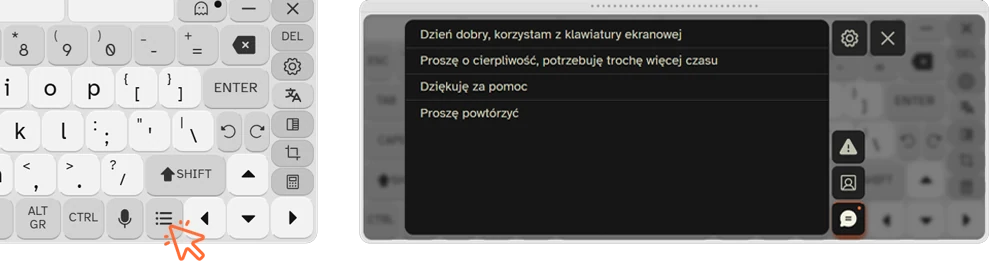
Whole sentences in one click
Write the answers you repeat once, not ten times. Email addresses, phone numbers, standard replies: you save them once and call them up with a single click whenever you need them.
AI prediction that knows your style
A local AI engine learns the way you write, so its suggestions get better every day. All of it on your own computer, with no internet connection needed.
And plenty more…
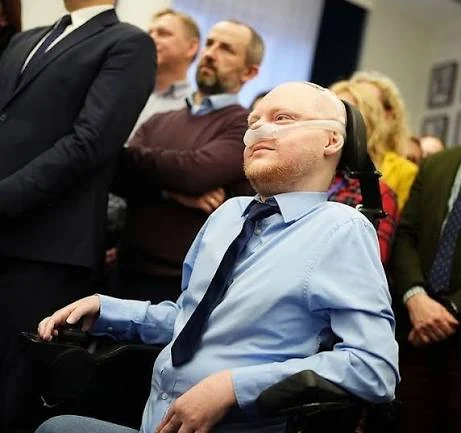
I built Klaavi
because I needed it myself.
I’ve had muscular dystrophy since I was a child.
Typing on a screen has always cost me a lot of effort. The keyboard kept covering the very thing I was looking at. I had to move it, click it away, set it up again. A small thing, in theory. Do it hundreds of times a day and it stops being small.
After leaving the Ministry I started a company. New work, more screen time, a great deal of writing. I thought it would finish me off. So instead of complaining, together with Maciek, who wrote the whole application, we built a keyboard that uses AI. I use Klaavi every day. And I’ve stopped moving the keyboard around.
What is your current keyboard costing you?
We measured it. The results are below.
fewer clicks than the on-screen keyboard they used before
faster typing than on the on-screen keyboard they used before
characters leave your computer. The prediction engine runs entirely on your machine, with no internet and no data in the cloud.
* Tested with 20 people who used Klaavi before launch. Each completed the same task first on the on-screen keyboard they had been using (most often the one built into Windows), then on Klaavi. Median values shown.
What early users say
Oh, I’ve waited so long for a keyboard like this. I spend most of the day at the computer, so how many clicks it takes to write what I want really matters. It’s much easier now.
I can’t use a regular keyboard. The computer is my everyday tool for studying, for staying in touch and for entertainment. Klaavi brings the keyboard layout, AI suggestions, Ghost Mode and autoclick together in one program. This is a solution built around the real needs of users like me.
For a long time I struggled with the standard keyboard built into Windows. Klaavi predicts what I want to write far better and far more accurately. I type a period and the next letter capitalizes itself, with no extra click. It shortens my typing time and saves my strength.
Klaavi is like a Swiss army knife: typing, text editing and clicking in one small tool. Ghost Mode lets me keep the keyboard always on top without covering my working area. As someone who works remotely and is professionally active, I recommend it wholeheartedly.
Still you.
Klaavi doesn’t change who you are
It only changes what it costs you to write what you already have to say. This is what an ordinary day looks like with it.
to my mom.
The whole email instead of a shortened one.
Every sentence, the jokes in parentheses, the question about my dad. The way it used to be, before writing started to cost something.
Without asking anyone for help. Done by four, like everyone else.
Three paragraphs explaining that you’re right. Because you are.
Start for free.
Stay with PRO if you feel the difference.
30 days of PRO for everyone. No card, no commitment. Whatever you choose, Klaavi stays on your computer.
No time limit, no card, no payment account. Full QWERTY layout with accented characters, 3 dictionary suggestions, autoclick, a dark and a light theme, eye tracker support and it works with every Windows application.
No account, no card.
Less than $4 a month, billed once a year. Everything in FREE, and on top of that:
The same file as the FREE version. You start the trial inside the app, with no card. After 30 days you decide.
Applicable taxes shown at checkout · Invoice available · Privacy policy · Terms of use